
Hide the menu bar icons
you rarely need
Park clutter behind a divider and bring it back with ⌥⌘B. When a physical notch hides an icon or a software island covers one, Pelmet tells you.
v0.10.0 · signed & notarized · Apple silicon and Intel
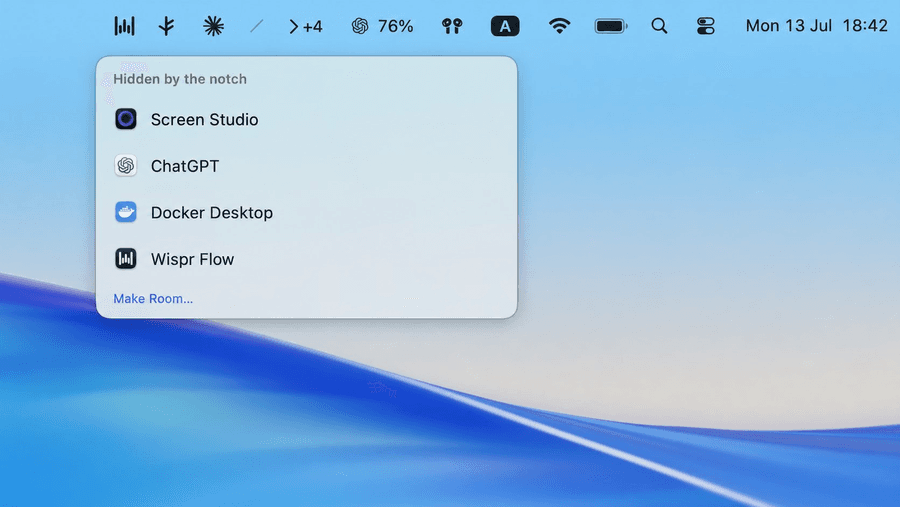
Hidden by the notch
- Screen recorder
- AI assistant
- Container runtime
- Dictation
Make Room…
Four icons parked behind the divider, four more that the notch took — named, not guessed.
The problem
macOS hides menu bar icons and never says a word
On a notched MacBook, macOS drops icons that do not fit beside the camera housing. On any display, a software island can cover icons without changing the space macOS thinks is available. Neither gives you an indicator or list.
01
You lose icons silently
Open an app with a long menu bar — Xcode, Logic, Photoshop — and status items vanish. Close it and they reappear. Nothing tells you which ones went.
02
Hiders make it worse
Most menu bar managers hide icons on purpose, which is fine — but they cannot distinguish that from macOS hiding icons by accident. You still cannot tell what is missing.
03
Pelmet counts them
Using public window geometry only, Pelmet counts the affected items, shows +N above its chevron, and names them in the Shelf.
Want the full explanation? Why the MacBook notch hides your menu bar icons
How it works
One divider, one toggle, no private APIs
Pelmet puts two items in your menu bar. Everything left of the divider is managed; everything right of it stays put.
[hidden icons…]  ╱  [always-visible icons…]  ‹  clock
                 │                           │
             separator                    toggle
Collapse
When you collapse, Pelmet inflates the separator's width, pushing everything to its left past the screen edge. Nothing is killed or restarted — the icons are just off-screen.
Expand
Click the chevron, press ⌥⌘B, or (optionally) hover the menu bar. The separator shrinks and your icons slide back into place.
Nothing exotic
This is the same expanding-spacer technique Hidden Bar and Dozer use. It needs no Screen Recording, no Accessibility, and no private API.
Features
Everything shipping today
No waitlist, no pro tier. This is what is in the current release.
Hide what you never click
⌘-drag the icons you always want to see to the right of the ╱ divider. Everything left of it collapses out of sight until you ask for it.
Learn moreNotch and software-island coverage
A physical notch can hide icons and a software island can cover them on any display. Pelmet puts a +N badge above its chevron and tells you which apps are affected.
Learn moreThe Shelf
Click the count to open a frosted panel listing every covered item by app icon and name. It is never a screen capture, so there is no Screen Recording prompt.
Learn morePointer-safe one-click access
Opt in and Pelmet opens compatible hidden items using the actions they already advertise to macOS. It never posts a mouse event or moves your pointer.
Learn moreHover to reveal
Optional: move the pointer into the menu bar and the managed icons slide back. Auto-rehide puts them away again.
Learn moreMake Room
Settings → Make Room tightens system icon spacing and points at the other levers macOS gives you, so more icons fit beside an obstruction in the first place.
Learn more
The Shelf
See what the notch hid or an island covered
Rows show each affected item's real app icon and name, read from public window metadata. It is never a screen capture, so there is no Screen Recording permission or purple recording indicator.
- Open it by clicking the +N count, or with ⌥⌘N
- Frosted, rounded, and positioned below the active obstruction
- “Make Room…” links straight to the settings that free up space
Privacy
Zero permissions. No accounts. No tracking SDKs.
Pelmet is a menu bar utility, not a data business. It makes exactly two kinds of network call, and you control both.
Update checks
Sparkle asks you once before enabling checks. Updates are EdDSA-signed and never install without your approval.
One anonymous ping a day
App version, macOS version, chip type, and which Pelmet features are on. No menu bar contents, nothing about your other apps, and IP addresses are discarded on arrival.
Off in one line
Toggle it in Settings, run defaults write com.ismatbabirli.Pelmet telemetryEnabled -bool NO, or set DO_NOT_TRACK=1.
Crash reports stay local
After a crash Pelmet offers to open a prefilled GitHub issue that you review and submit yourself. Nothing leaves your Mac automatically.
Compare
How Pelmet stacks up
Every one of these is a good app. Here is where they actually differ.
| Capability | Pelmet | Bartender | Ice | Hidden Bar |
|---|---|---|---|---|
| Price | Free | Paid | Free | Free |
| Open source | ✓ | — | ✓ | ✓ |
| Works with no permissions | ✓ | — | ◑ | ✓ |
| Reports notch or software-island coverage | ✓ | — | — | — |
| No third-party analytics SDK | ✓ | — | ✓ | ✓ |
Install
Two ways in, both about a minute
Homebrew (recommended)
$brew install --cask ismatBabirli/pelmet/pelmetTaps ismatBabirli/homebrew-pelmet and installs the notarized app into /Applications.
Direct download
Pelmet is menu-bar-only. After launching, look next to the clock, not in the Dock.
Prefer to build it yourself? Build from source in three commands
FAQ
Common questions
- Is Pelmet free?
- Yes. Pelmet is free and open source under the MIT licence, with no paid tier, no accounts, and no trial period. Contributions through Polar are optional.
- Does Pelmet need Accessibility or Screen Recording permission?
- No. Hiding and showing icons, physical-notch and software-island coverage detection, and the Shelf all work with zero special permissions. Only the optional one-click access feature asks for Accessibility.
- Which macOS versions does Pelmet support?
- macOS 13 Ventura or later, on both Apple silicon and Intel Macs. Releases are signed and notarized by Apple, so they open without a Gatekeeper warning.
- How is Pelmet different from Bartender or Hidden Bar?
- Pelmet is free and MIT licensed like Hidden Bar, but it also reports icons hidden by a physical notch or covered by a calibrated software island. A +N badge shows the count and the Shelf names the affected applications.
Get your menu bar back
Free, open source, and signed by Apple. Two lines of terminal or one drag to Applications.
$brew install --cask ismatBabirli/pelmet/pelmet